Firstly the task for this unit was to work collaboratively and use different digital mediums to express the threat to animal habitats due to climate change today, for an audience of 5-17 year olds. I’ve had several ideas about this theme before, but I’ve always thought of it as very serious and complicated leading to a long time spent on the design, but after all it’s collaborative so I tended to listen to the group this time. In terms of collaboration, I’ve already had experience with the last collaborative project, so I’m excited to work with Bipanchy, Sofia, and Jack on this one. Finally, I will talk about my process and reflections in chronological order.
My assignment
Since I’m the most proficient blender user in the group, I decided to do the modeling part of the whole project from the beginning, which includes the Boom mic, Sardines, Baby chair (Not in use), Wires (Not in use), lighting setup as well as the penguin’s modelling and skeleton binding. At the end, I was also responsible for four shots in the project, that is 25% of the whole animation.
November – Origin of Animation story
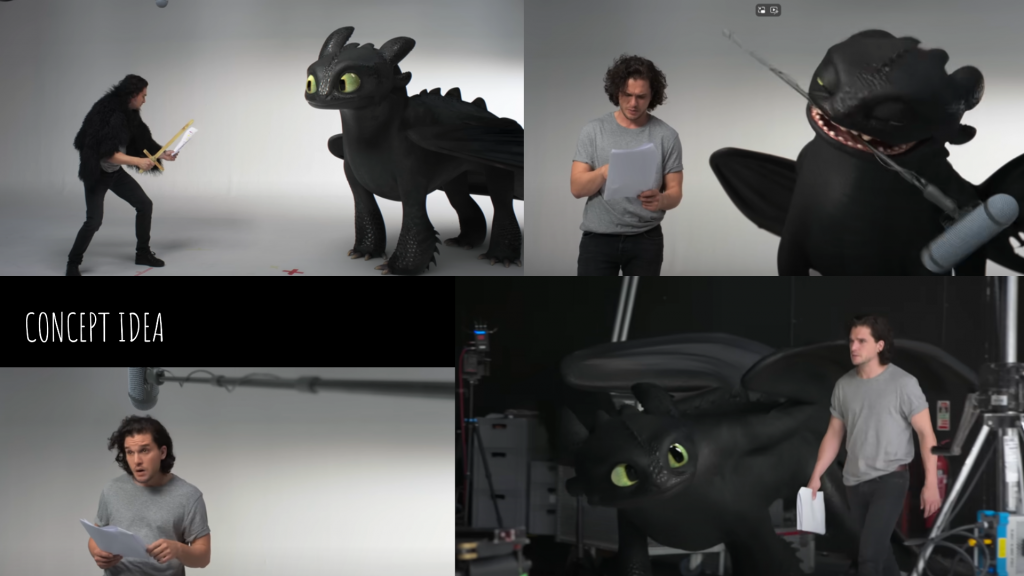
The first week of the unit, we went ahead and decided on the form and style of our creation. We didn’t want to take any chances, so we unanimously decided to submit it as an animation. We didn’t rush the decision on which style to use, but first allowed each of us to research and find information to determine what the narrative would be. Luckily, Bipanchy found a great example in a Youtube video called Kit Harington and Toothless’ Lost Audition Tapes, which shows Toothless interacting with the presenter in a studio audition. Inspired by Toothless’ rather witty and quirky performance style, which captivated the audience, including us, we decided to tell the story of the climate crisis in the same way, and decided that the penguins would be realistic in style.
Since I’m the only one responsible for the modelling part and I need a lot of time, I went ahead and confirmed with the group in advance the few 3D models that would probably need to be modelled (Boom mic, Sardines, Baby chair, Wire). Meanwhile, Sofia will be responsible for writing the script and Bipanchy will be responsible for designing the appearance of the penguins.
How I solve technical problems – Boom mic
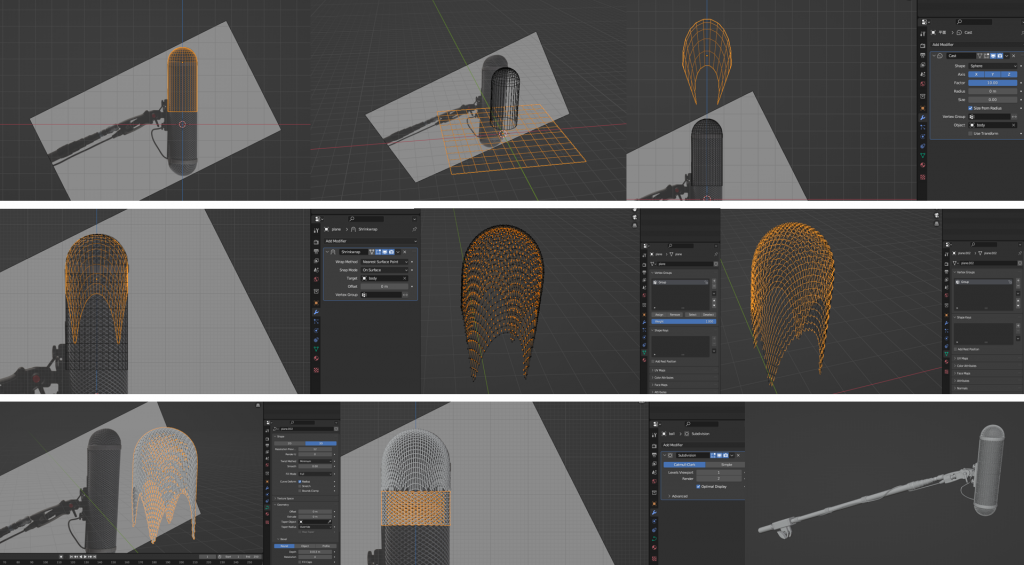
The hardest part of the Boom mic is the mesh that crosses the arcs on the surface, so I found a tutorial for that on youtube. Firstly, I create the basic shape of the Boom mic. Second, create the subdivision surface mesh then add the Cast modifier. Third, add the Shrinkwrap modifier to define the mesh curvature on the basic shape. Fourthly, select the spacer points to be recessed inwards and repeat this step to complete the cross mesh shape. Finally, the mesh is converted to a curve and extruded to form a tube structure.
Remaining object modelling process (not used) – Why?
Unfortunately, we thought Molly would teach us how to use motion tracking to solve the technical problem of how to locate the penguin’s position due to the fact that our camera produces a massively oscillating frame view when filming, but it was clear that this was impractical as it was complex and took a lot of time. So until we learnt this information, we thought the models were valid. But in the end, none of these models were used in the animation because we were forced to change our production methods.
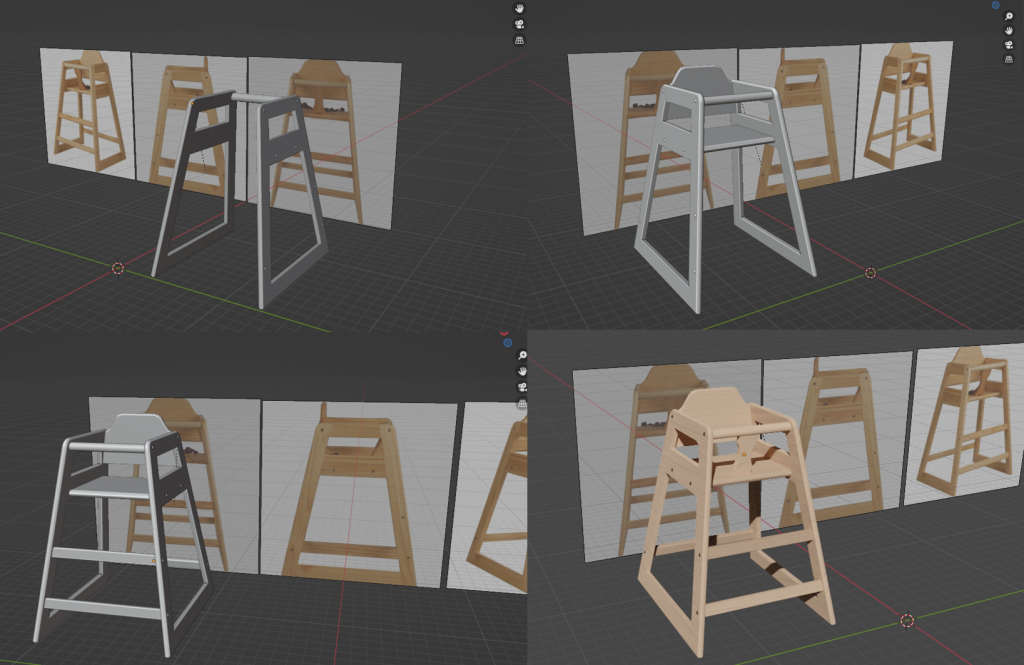
The baby chair, originally placed next to the presenter, is where the penguins sit. But during the shoot we used a real life chair as a marker and according to the script presenter needed to sit on it so it was cancelled.
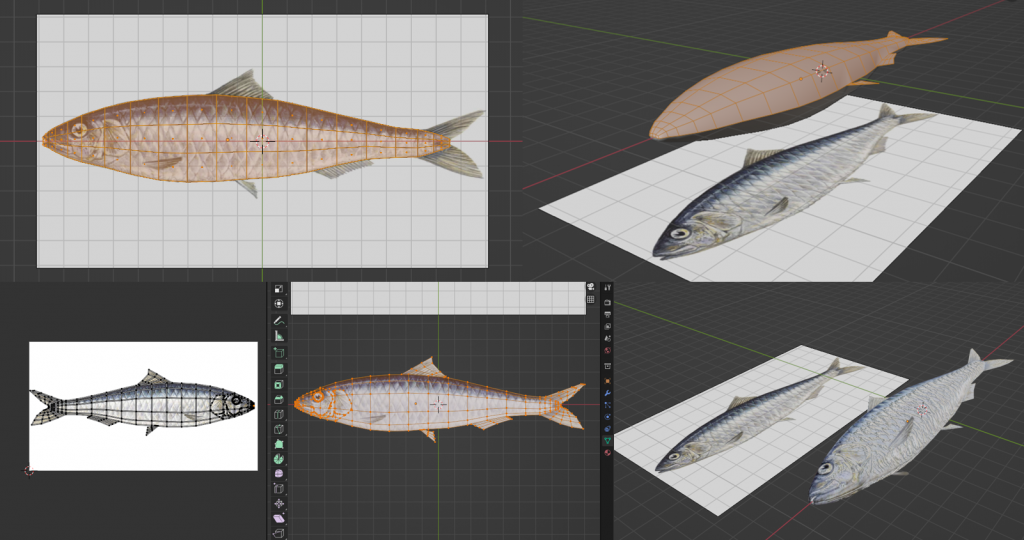
Sardine, which was originally presented as a food dish, was cancelled because it was impossible to present the swallowing shot in the animation to interact with the presenter and the penguin.
December – How We Shoot Live Action Video?
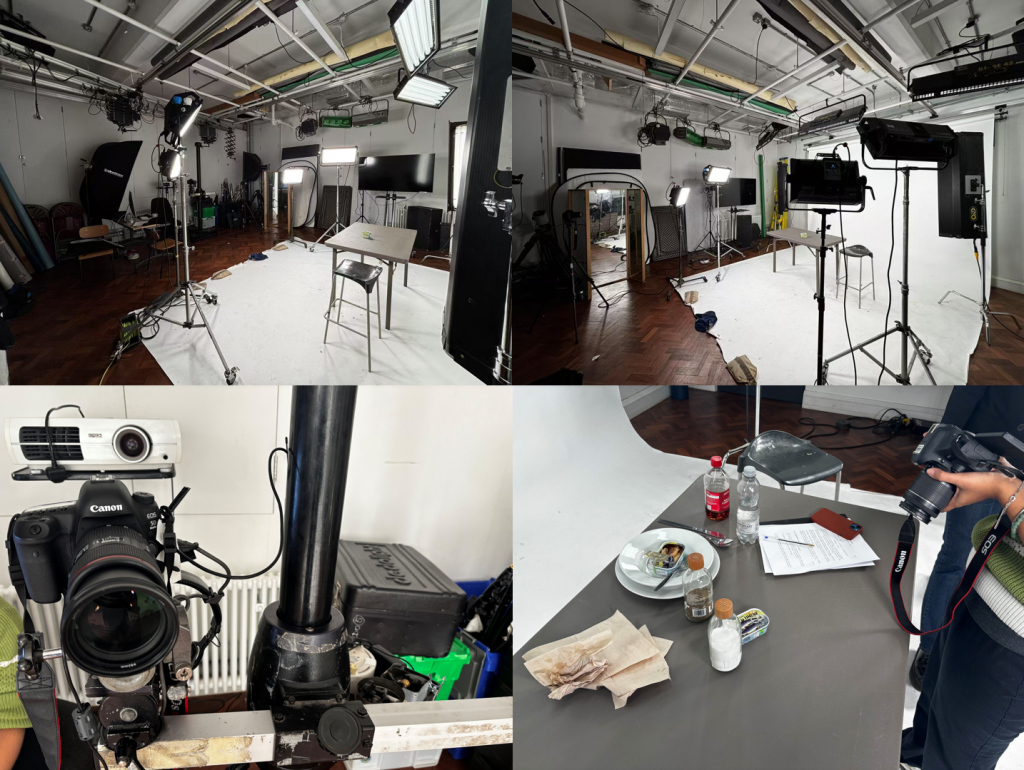
Firstly, this is the location we booked in the observatory for a 3 day shoot. The props, plates and condiments were borrowed from the canteen, and the canned sardines were delivered via takeaway. As Jack wasn’t involved in the filming, this made it more difficult for us to film.
Since there were only three of us, and our shots required a lot of switching and movement, it meant that we needed at least two cameras in sync, but besides the presenter (Sofia) we needed one more person to hold the boom mic, which meant we needed to shoot frame-by-frame, and when the shot didn’t require me to hold the boom mic I needed to go back to the camera and shoot another shot, and vice versa. When the shot doesn’t require me to hold the boom mic, I need to go back to the camera and shoot another shot, and vice versa, we have to rely on (Bipanchy) to shoot from a fixed host position.
There were a lot of challenges and problems in between, but I won’t go into all of them. All in all, due to the lack of manpower and time for the shoot as well as the many problems that arose in the middle of the process, we were not happy with the outcome of the shoot.
The Hardest Part – Penguin Modelling to Rigging
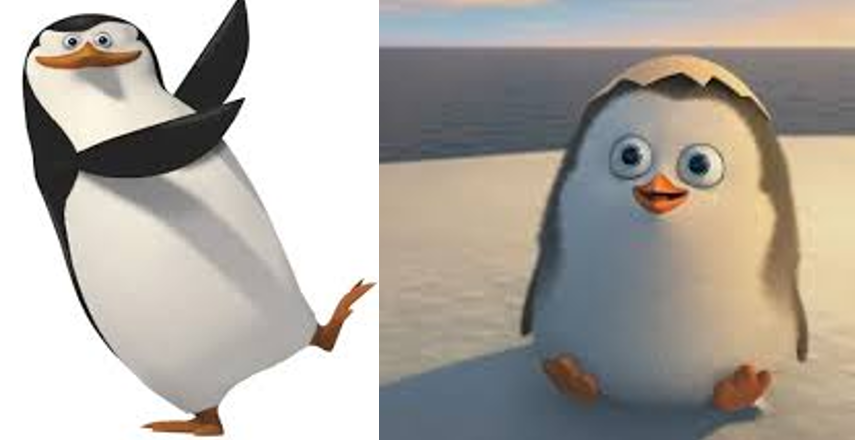
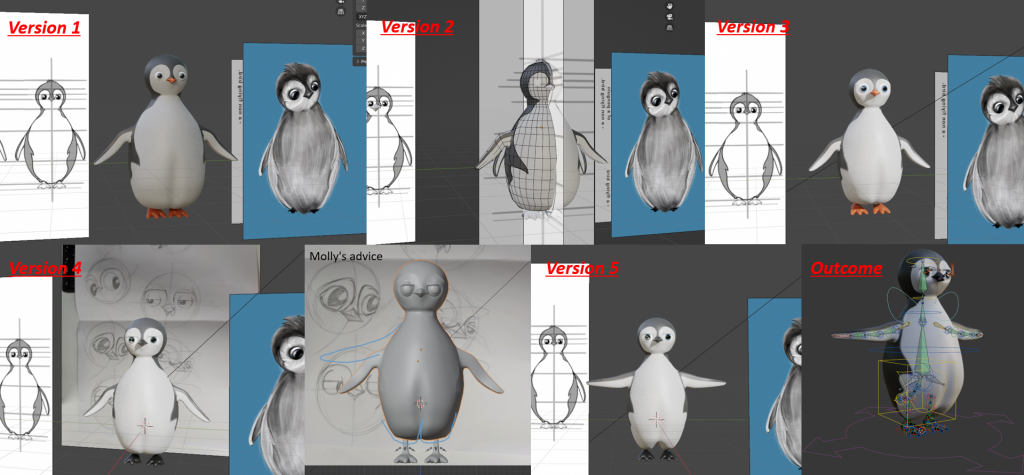
This was the biggest challenge I’ve encountered so far, as I’m only good at modelling hard surface materials like spaceship robots, modelling creatures and binding bones was a nightmare for me. It wasn’t until the first week after Christmas that I settled on a final 3D look for the penguin, which went through 5 iterations during this period.
As Bipanchy’s character design was not rigorous, the sketches did not correlate with each other at different angles on the sketch, making it easy to have, for example, a penguin that I was modelling on the front, turn to the side and have a difference in size and shape to that shown in the sketch, and then turn to the back where the model and the sketch would be very different again. In order to reasonably show the penguin in my imagination and that of my team members, I used some penguin references from animated films, such as the penguins of Madagascar and the real penguin’s form to make a second design and improvement on the original model. In version 3, I settled on the basic appearance.
At this point, Molly showed up and examined my model and pointed out a few problems. Since the penguin needed to be rigged perfectly mobile, some of the problems included the arms needing to be raised (T pose), as well as the feet needing to be elongated and the thighs needing to be added to connect to the body, and lastly the face needing to be re-topologised.
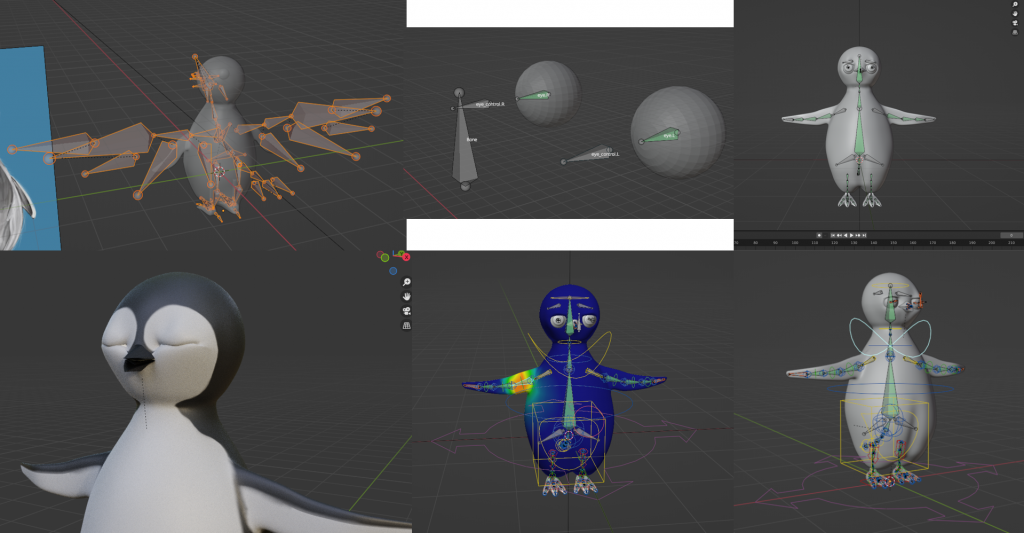
So by version 4, I had solved the first two problems, but the topology was too hard for me and I had very little time left so I gave up. Eventually, using the bird skeleton from the rigify plugin, by repositioning the bones and adding and removing some local bones, as well as rebrushing the weights of each bone, and finally adding eye tracking and eyelid movement (blinking) using the Shape key,I finally solved all the rigging issues for the penguin with Molly’s help. (I had to remove the fur due to the length of time it would have taken to render).
January – Production of animation (final stage)
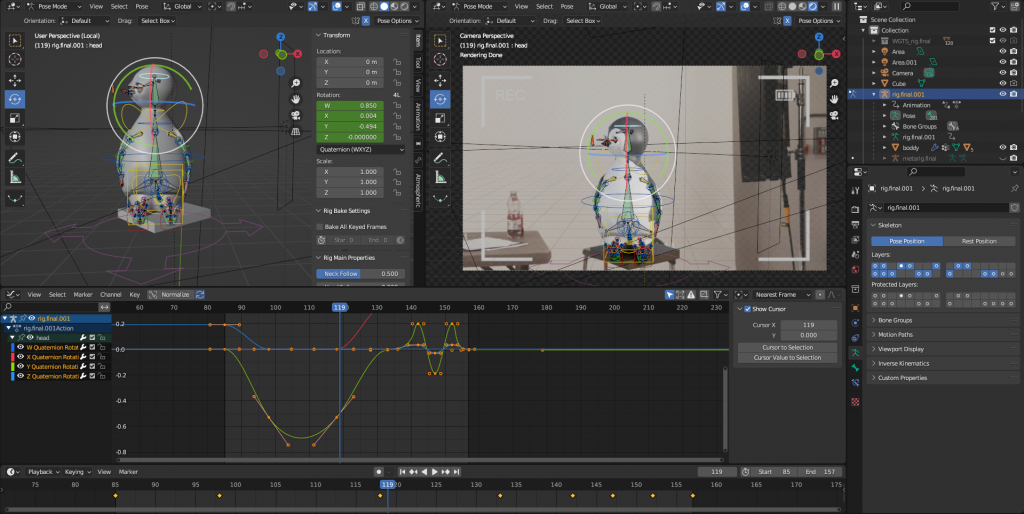
Animating the character was a bit of a headache for me, as I’m quite an introvert myself, so it was hard for me to show how the penguin transitioned between different poses by imagining them. In fact, when Paul saw the first few penguin-animated shots, it was obvious that they looked like robots, so he showed me how to use blender’s curve editor to make the transitions from motion to motion look natural.
For example, in this picture, the original green line (head rotation) is a straight line transition from frame 98 to 118, the penguin’s head rotation in the animation is very sudden, and after changing it to a curve, the head rotation value (amplitude) becomes bigger, so it is obviously much more natural.
Cooperative unit summary
I’m glad that there was a lot of communication between the team members so that everyone contributed and there were no major conflicts (except Jack). Especially Bipanchy, as the ‘lubricant’ of the whole project, communicated with me and Sofia every day, followed up, recorded the progress of the project and explained what we need to accomplish at this stage, even though there were only three of us working on the project, which made us much more efficient.
Overall, although the final animation was not what my team and I had hoped for, there is no doubt in my mind that the collaboration was a success, and if we had had more time, we all believe we could have done better.